


Work
Resume
About Me
COMPARATIVE ANALYSIS - WORKFLOW DIAGRAMMING - DESIGN SUGGESTIONS
BPS
I researched market processes to support a client's design use case, improving the data induction methods. Also crafted questions for client to ask primary stakeholders during project review.

Timeline
May 2024 - July 2024
Tools
Figma, Miro
Overview
The stakeholder was developing a tool that would help users update information about their buildings' energy usage, allowing them to keep up to date with rolling building performance standards(BPS) audits.
Due to the scope of the project, there was a lot of information needed to be learned about the audit process and its users, so that the stakeholder could further improve their tool.
I was tasked with understanding and diagramming the industry standard BPS process to help in designing methods of incorporating outside data collection tools into the stakeholder's site.
Who Was I?
Acting as the User Research Lead, I researched and compiled information regarding the BPS process, led stakeholder sessions to gather more information, and provided workflows suggestions with help from my mentor.
Overall Process
01
Comparative Assessment
02
Workflow Creation
03
Design Suggestions
04
Stakeholder Meeting
Context Gathering
Getting Started
I conducted a comparative assessment of Portfolio Manager(PM), a suite of tools created by Energy Star that allows building owners to manage their properties' energy usage and prepare for building audits.
Through this method, I found that Portfolio Manager provided a lot of options for building managers to store and use their data but the methods for sharing data with others was fragmented into three different methods that made it difficult for people to understand the process of exporting data:
Data API
Data Requesting
Data Sharing
I documented this process and explained it to my stakeholder via web flow diagrams to make the information easier to understand, whilst still getting across the site's various features.
This leg to various questions about the site and its features:
- Were there ways of tracking historical data?
- How is the data being managed?
- How are users hosting their data?
This led to a major insight:
“There was no universal method between users for receiving and sharing data.”
This process allowed me to learn a lot about the various methods that PM provided to its users and gave me good ground to move forward with finding a solution.
Cementing Workflows
Exploring Solutions
Having gathered insight about the various data upload methods, I realized that the method for ingesting data into the tool needed to be flexible enough in order to account for the different ways users could enter data.
This realization allowed me to move onto the next process of cementing the sharing process between users.
Due to the nature of the data being shared, users would need to have some way of verifying that each side has agreed to share data with each other. To aid in this, I designed workflows outlining the process a user would take when deciding to share data.
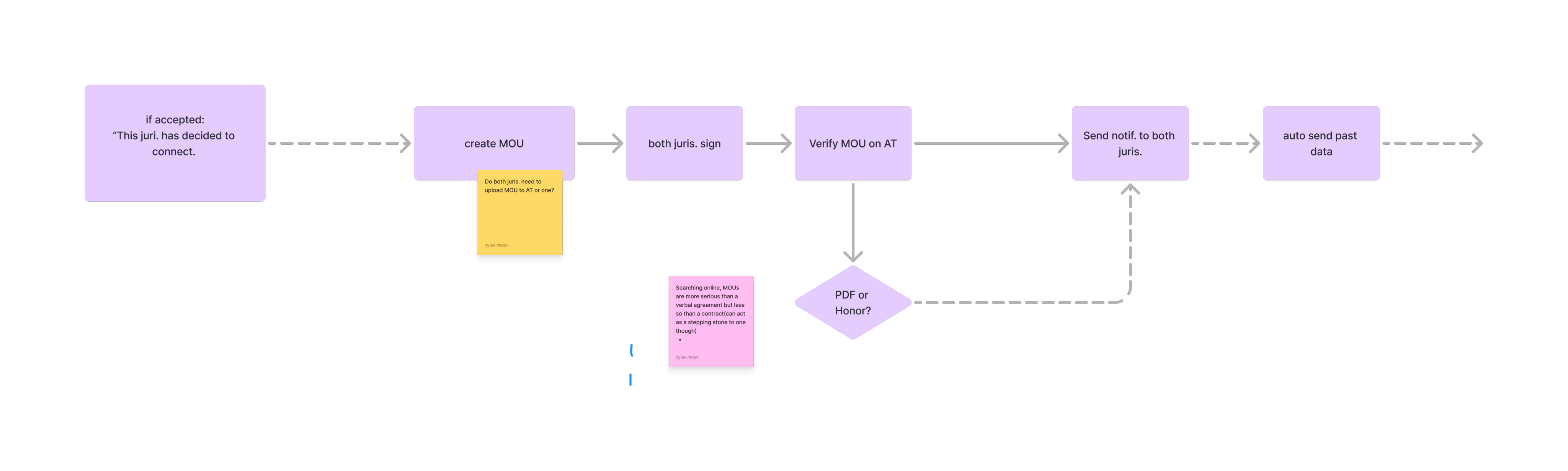
I brought in my mentor at this point to help with ideation for solutions to help with my bias as well as get their expertise regarding the context.
For sharing and sending data, we decided that having a system similar to PM and social media platforms such as Instagram, where you could add people and then send information, would be the most useful method.
The problem came in deciding methods of verifying that both sides have signed the agreement.
- Our first idea was to have a document on the site that both sides could sign, however, this could lead to issues with privacy as well as legal issues so it would not work
Another thing we learned, was that each side could sign the document off site/online and might need to upload it. We were able to come up with a couple more options based on that:
Auto verify the agreement and send the data once it goes through
Have both sides manually check off their data
Have one side upload their version and the other side check before data is sent
We decided, given the resources, that the third way would work better as it would take onus off the user to recheck the legal documents. It also added an extra layer of protection, in case one side need to change the document.
Finishing Off
Creating Questions
With the final workflow out of the way, we handed it off to the stakeholder, who signed off on them. They were glad to have had the help and additional context about the user base! They invited me to further support the project via helping them with questions and notetaking for their quarterly stakeholder/sponsor progress checks, which would involve interfacing with direct users of their new tool.
I created a series of questions that helped clarify the legal requirements that sharing data might need in the future, alongside general questions as to the user's workflow to further validate and edit our designs to meet their needs.
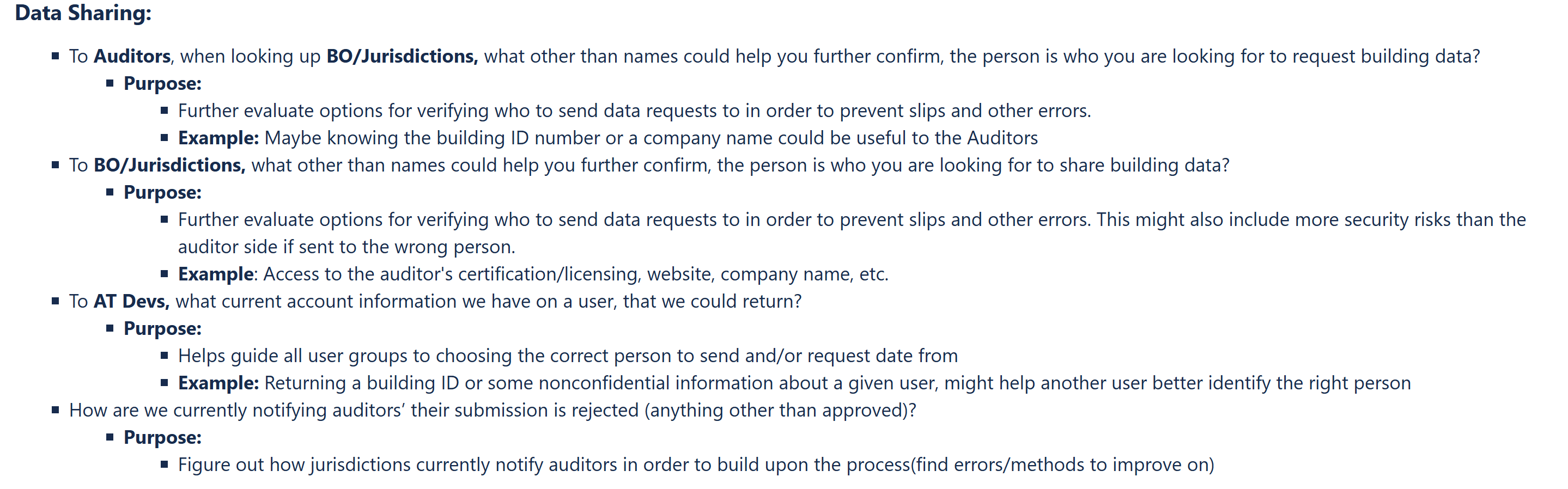
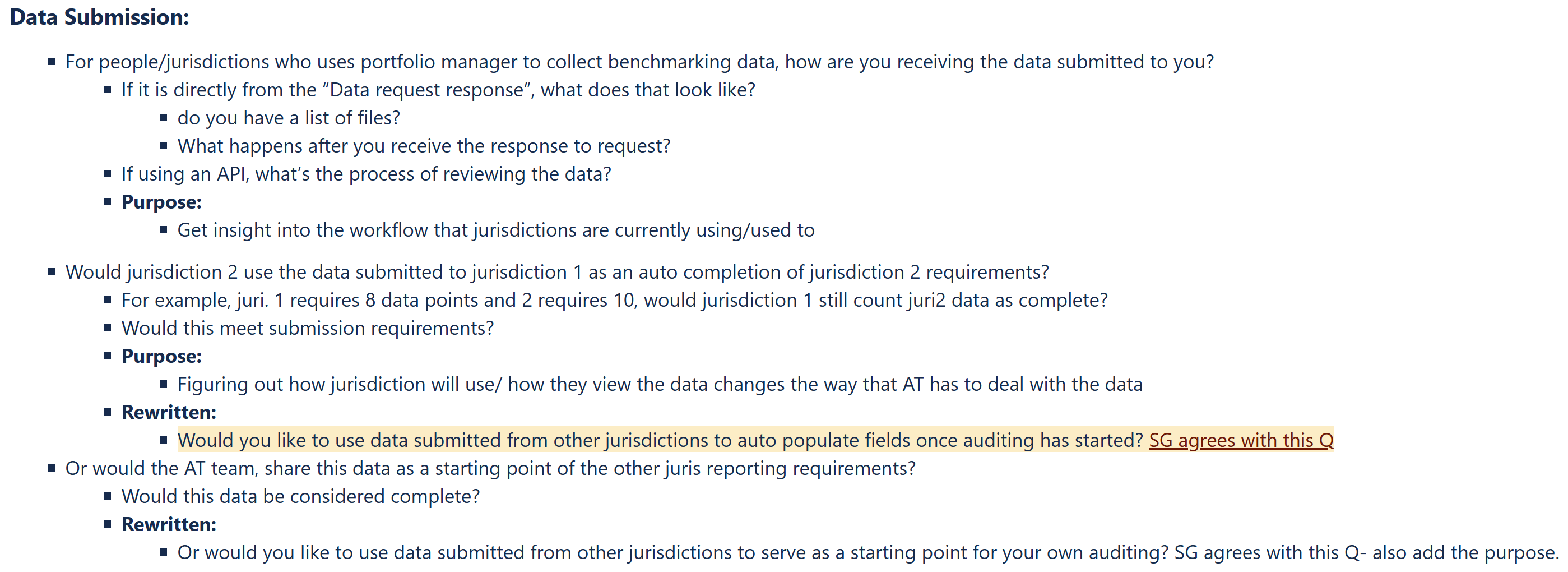
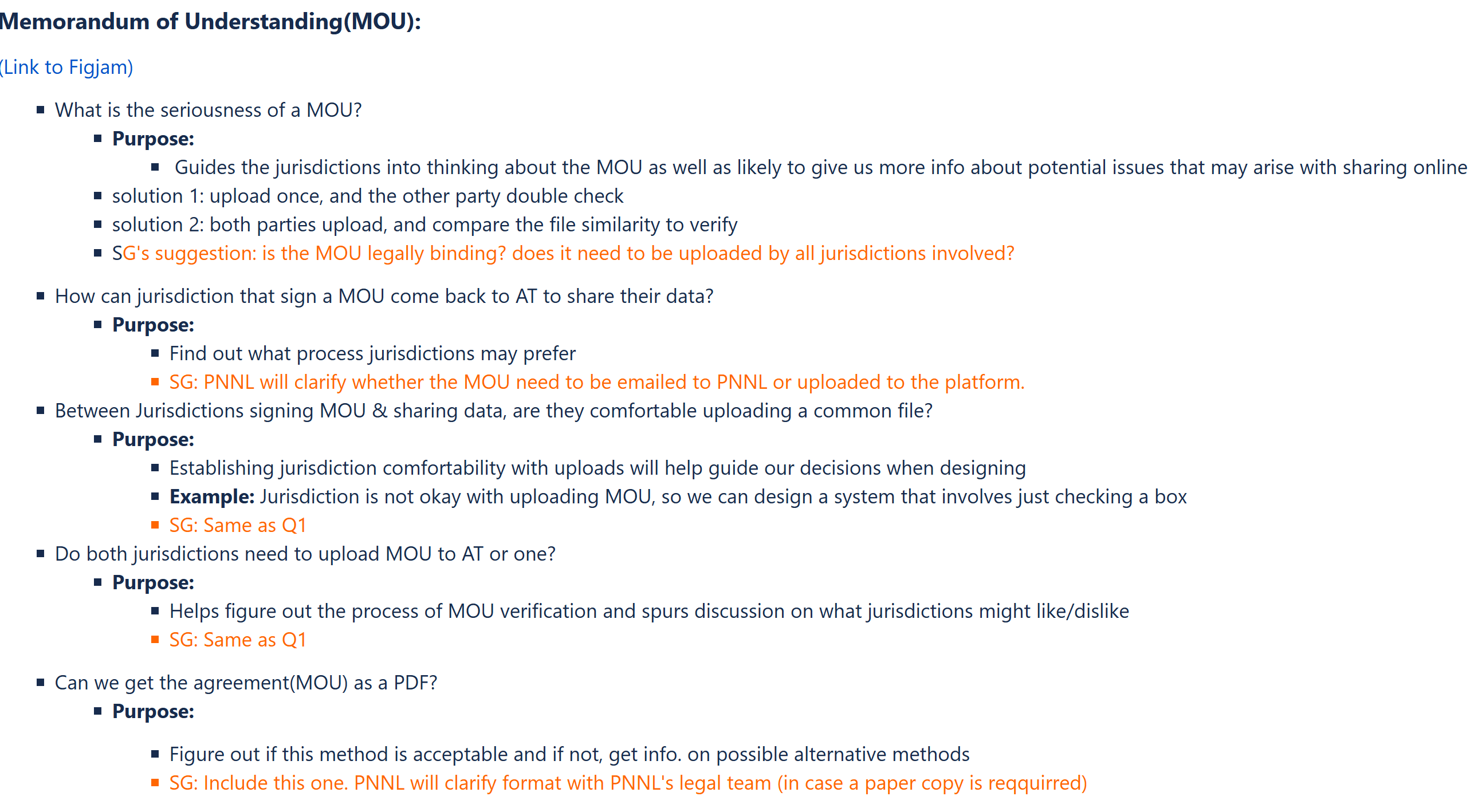
These questions were then presented and we were able to get some feedback for the future.
All in all, the project turned out to be a success and the stakeholder was able to further design their application due to the feedback and user workflows that were delivered.
Lessons Learned
Create Artifacts for Understanding
One of the first things I learned on this project was to create artifacts that could be easily understood. When I created the site workflows, I initially just used shapes to describe the whole process of the site I was comparing. This made it overly difficult to understand because there was so much information and it was an unfamiliar site. So I shifted it to include actual images of the site with clarification on more complex features and tools. This improved both my own and the stakeholder’s understanding and bettered our communication moving forward.
Make Sure Your Background Knowledge is Good Enough
Due to this being one of my first projects during my internship, my subject knowledge regarding the area was lacking. I spent a lot of time during the research to make sure I knew a lot but during meetings, I would sometimes be asked questions I didn’t know the answer to or have something go over my head.
What I did to improve this was read back up on old documentation, both those created by those on the team as well as my own, look into other projects and documents relating to the area, as well as during meetings not being afraid to ask them to reclarify or explain a topic to me. I also made sure that if I didn’t know something, I would let them know but tell them I would look into the matter or give them the best solution that I could at the time.
This allowed me to learn a lot, while also being able to further contribute and hold my weight in conversations with the stakeholders.


Work
Resume
About Me
COMPARATIVE ANALYSIS - WORKFLOW DIAGRAMMING - DESIGN SUGGESTIONS
Building Performance Standards
I researched market processes to support a client's design use case, improving the data induction methods. Also crafted questions for client to ask primary stakeholders during project review.

Timeline
May 2024 - July 2024
Tools
Figma, Miro
Overview
The stakeholder was developing a tool that would help users update information about their buildings' energy usage, allowing them to keep up to date with rolling building performance standards(BPS) audits.
Due to the scope of the project, there was a lot of information needed to be learned about the audit process and its users, so that the stakeholder could further improve their tool.
I was tasked with understanding and diagramming the industry standard BPS process to help in designing methods of incorporating outside data collection tools into the stakeholder's site.
Who Was I?
Acting as the User Research Lead, I researched and compiled information regarding the BPS process, led stakeholder sessions to gather more information, and provided workflows suggestions with help from my mentor.
Overall Process
01
Comparative Assessment
02
Workflow Creation
03
Design Suggestions
04
Stakeholder Meeting
Context Gathering
Getting Started
I conducted a comparative assessment of Portfolio Manager(PM), a suite of tools created by Energy Star that allows building owners to manage their properties' energy usage and prepare for building audits.
Through this method, I found that Portfolio Manager provided a lot of options for building managers to store and use their data but the methods for sharing data with others was fragmented into three different methods that made it difficult for people to understand the process of exporting data:
Data API
Data Requesting
Data Sharing
I documented this process and explained it to my stakeholder via web flow diagrams to make the information easier to understand, whilst still getting across the site's various features.
This leg to various questions about the site and its features:
- Were there ways of tracking historical data?
- How is the data being managed?
- How are users hosting their data?
This led to a major insight:
“There was no universal method between users for receiving and sharing data.”
This process allowed me to learn a lot about the various methods that PM provided to its users and gave me good ground to move forward with finding a solution.
Cementing Workflows
Exploring Solutions
Having gathered insight about the various data upload methods, I realized that the method for ingesting data into the tool needed to be flexible enough in order to account for the different ways users could enter data.
This realization allowed me to move onto the next process of cementing the sharing process between users.
Due to the nature of the data being shared, users would need to have some way of verifying that each side has agreed to share data with each other. To aid in this, I designed workflows outlining the process a user would take when deciding to share data.
I brought in my mentor at this point to help with ideation for solutions to help with my bias as well as get their expertise regarding the context.
For sharing and sending data, we decided that having a system similar to PM and social media platforms such as Instagram, where you could add people and then send information, would be the most useful method.
The problem came in deciding methods of verifying that both sides have signed the agreement.
- Our first idea was to have a document on the site that both sides could sign, however, this could lead to issues with privacy as well as legal issues so it would not work
Another thing we learned, was that each side could sign the document off site/online and might need to upload it. We were able to come up with a couple more options based on that:
- Auto verify the agreement and send the data once it goes through
- Have both sides manually check off their data
- Have one side upload their version and the other side check before data is sent
We decided, given the resources, that the third way would work better as it would take onus off the user to recheck the legal documents. It also added an extra layer of protection, in case one side need to change the document.
Finishing Off
Creating Questions
With the final workflow out of the way, we handed it off to the stakeholder, who signed off on them. They were glad to have had the help and additional context about the user base! They invited me to further support the project via helping them with questions and notetaking for their quarterly stakeholder/sponsor progress checks, which would involve interfacing with direct users of their new tool.
I created a series of questions that helped clarify the legal requirements that sharing data might need in the future, alongside general questions as to the user's workflow to further validate and edit our designs to meet their needs.
These questions were then presented and we were able to get some feedback for the future.
All in all, the project turned out to be a success and the stakeholder was able to further design their application due to the feedback and user workflows that were delivered.
Lessons Learned
Create Artifacts for Understanding
One of the first things I learned on this project was to create artifacts that could be easily understood. When I created the site workflows, I initially just used shapes to describe the whole process of the site I was comparing. This made it overly difficult to understand because there was so much information and it was an unfamiliar site. So I shifted it to include actual images of the site with clarification on more complex features and tools. This improved both my own and the stakeholder’s understanding and bettered our communication moving forward.
Make Sure Your Background Knowledge is Good Enough
Due to this being one of my first projects during my internship, my subject knowledge regarding the area was lacking. I spent a lot of time during the research to make sure I knew a lot but during meetings, I would sometimes be asked questions I didn’t know the answer to or have something go over my head.
What I did to improve this was read back up on old documentation, both those created by those on the team as well as my own, look into other projects and documents relating to the area, as well as during meetings not being afraid to ask them to reclarify or explain a topic to me. I also made sure that if I didn’t know something, I would let them know but tell them I would look into the matter or give them the best solution that I could at the time.
This allowed me to learn a lot, while also being able to further contribute and hold my weight in conversations with the stakeholders.
Work
Resume
About Me
COMPARATIVE ANALYSIS - WORKFLOW DIAGRAMMING - DESIGN SUGGESTIONS
Building Performance Standards
I researched market processes to support a client's design use case, improving the data induction methods. Also crafted questions for client to ask primary stakeholders during project review.

Timeline
May 2024 - July 2024
Tools
Figma, Miro
Overview
The stakeholder was developing a tool that would help users update information about their buildings' energy usage, allowing them to keep up to date with rolling building performance standards(BPS) audits.
Due to the scope of the project, there was a lot of information needed to be learned about the audit process and its users, so that the stakeholder could further improve their tool.
I was tasked with understanding and diagramming the industry standard BPS process to help in designing methods of incorporating outside data collection tools into the stakeholder's site.
Who Was I?
Acting as the User Research Lead, I researched and compiled information regarding the BPS process, led stakeholder sessions to gather more information, and provided workflows suggestions with help from my mentor.
Overall Process
01
Comparative Assessment
02
Workflow Creation
03
Design Suggestions
04
Stakeholder Meeting
Context Gathering
Getting Started
I conducted a comparative assessment of Portfolio Manager(PM), a suite of tools created by Energy Star that allows building owners to manage their properties' energy usage and prepare for building audits.
Through this method, I found that Portfolio Manager provided a lot of options for building managers to store and use their data but the methods for sharing data with others was fragmented into three different methods that made it difficult for people to understand the process of exporting data:
Data API
Data Requesting
Data Sharing
I documented this process and explained it to my stakeholder via web flow diagrams to make the information easier to understand, whilst still getting across the site's various features.
This leg to various questions about the site and its features:
- Were there ways of tracking historical data?
- How is the data being managed?
- How are users hosting their data?
This led to a major insight:
“There was no universal method between users for receiving and sharing data.”
This process allowed me to learn a lot about the various methods that PM provided to its users and gave me good ground to move forward with finding a solution.
Cementing Workflows
Exploring Solutions
Having gathered insight about the various data upload methods, I realized that the method for ingesting data into the tool needed to be flexible enough in order to account for the different ways users could enter data.
This realization allowed me to move onto the next process of cementing the sharing process between users.
Due to the nature of the data being shared, users would need to have some way of verifying that each side has agreed to share data with each other. To aid in this, I designed workflows outlining the process a user would take when deciding to share data.
I brought in my mentor at this point to help with ideation for solutions to help with my bias as well as get their expertise regarding the context.
For sharing and sending data, we decided that having a system similar to PM and social media platforms such as Instagram, where you could add people and then send information, would be the most useful method.
The problem came in deciding methods of verifying that both sides have signed the agreement.
- Our first idea was to have a document on the site that both sides could sign, however, this could lead to issues with privacy as well as legal issues so it would not work
Another thing we learned, was that each side could sign the document off site/online and might need to upload it. We were able to come up with a couple more options based on that:
- Auto verify the agreement and send the data once it goes through
- Have both sides manually check off their data
- Have one side upload their version and the other side check before data is sent
We decided, given the resources, that the third way would work better as it would take onus off the user to recheck the legal documents. It also added an extra layer of protection, in case one side need to change the document.
Finishing Off
Creating Questions
With the final workflow out of the way, we handed it off to the stakeholder, who signed off on them. They were glad to have had the help and additional context about the user base! They invited me to further support the project via helping them with questions and notetaking for their quarterly stakeholder/sponsor progress checks, which would involve interfacing with direct users of their new tool.
I created a series of questions that helped clarify the legal requirements that sharing data might need in the future, alongside general questions as to the user's workflow to further validate and edit our designs to meet their needs.
These questions were then presented and we were able to get some feedback for the future.
All in all, the project turned out to be a success and the stakeholder was able to further design their application due to the feedback and user workflows that were delivered.
Lessons Learned
Create Artifacts for Understanding
One of the first things I learned on this project was to create artifacts that could be easily understood. When I created the site workflows, I initially just used shapes to describe the whole process of the site I was comparing. This made it overly difficult to understand because there was so much information and it was an unfamiliar site. So I shifted it to include actual images of the site with clarification on more complex features and tools. This improved both my own and the stakeholder’s understanding and bettered our communication moving forward.
Make Sure Your Background Knowledge is Good Enough
Due to this being one of my first projects during my internship, my subject knowledge regarding the area was lacking. I spent a lot of time during the research to make sure I knew a lot but during meetings, I would sometimes be asked questions I didn’t know the answer to or have something go over my head.
What I did to improve this was read back up on old documentation, both those created by those on the team as well as my own, look into other projects and documents relating to the area, as well as during meetings not being afraid to ask them to reclarify or explain a topic to me. I also made sure that if I didn’t know something, I would let them know but tell them I would look into the matter or give them the best solution that I could at the time.
This allowed me to learn a lot, while also being able to further contribute and hold my weight in conversations with the stakeholders.